
ShiftKit Pro
Thirty things, and none of them a paywall on your own roster.
Pro is the rest of the toolkit: the long view of your history, the roster built for you rather than typed in, the same records on every device, what you eat and take, how your body reads a swing, and the parts that deal with money, travel and named products. One purchase covers iPhone, iPad, Mac and Apple Watch.
AUD $7.99 a month, $44.99 a year, or $119.99 once
A 7-day free trial on the subscriptions. Prices are in Australian dollars and are subject to App Store pricing at launch; bought from elsewhere, the App Store charges you in your own currency and the figure it shows at checkout is the one that applies.
Roster
The swing built for you, then left alone
- Roster Pattern Builder. Generate repeating rosters — 4-on 4-off, 2-2-3, 7-on 7-off, FIFO swings like 8 and 6 or 14 and 14, or a pattern of your own. Each day of a block can carry its own stamp, so a swing runs days and then nights.
- Repeat until you stop it. About six months stays on the calendar and is topped up each time you open the app. Stopping it asks whether to leave what is there or take the untouched days ahead back off.
- Clear a run of days. Set two dates and a fortnight of swing comes off in one go, stamped as leave in the same action if you want. The days that were already off stay off, and the whole run goes back the way it was in one tap.
- Shift Time Library. As many start and finish times as your roster actually uses, with a site attached to each, instead of one day time and one night time.
- Roles & Sites. A different role for every site and every shift, filled in from your usual one and changed in a tap when the day is different.
- Travel Logistics. Your own car, a hire car, the company car, or flying, recorded against the day.
- Itinerary Import. Hand it the PDF or Word itinerary your employer sent and it reads out the flights, the hire car and the hotel and offers them to your roster. Share straight from your email app, and keep the documents on file for as long as you choose.
The long view
Past the seven days free shows you
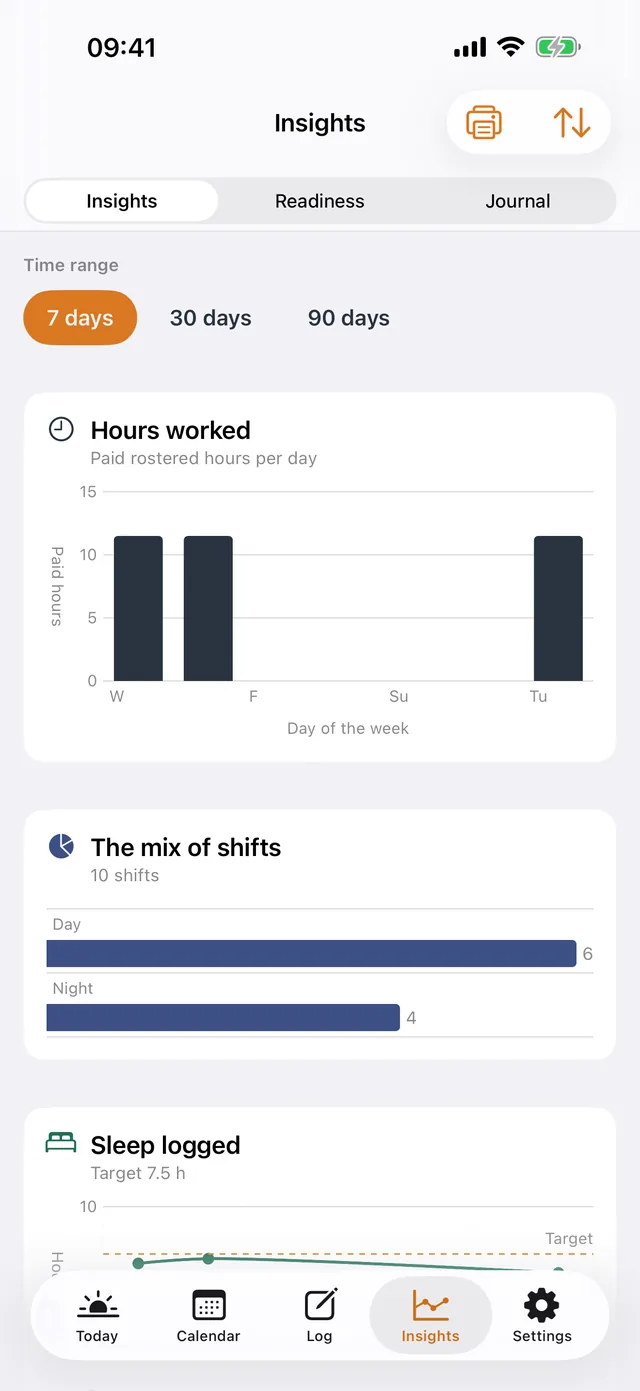
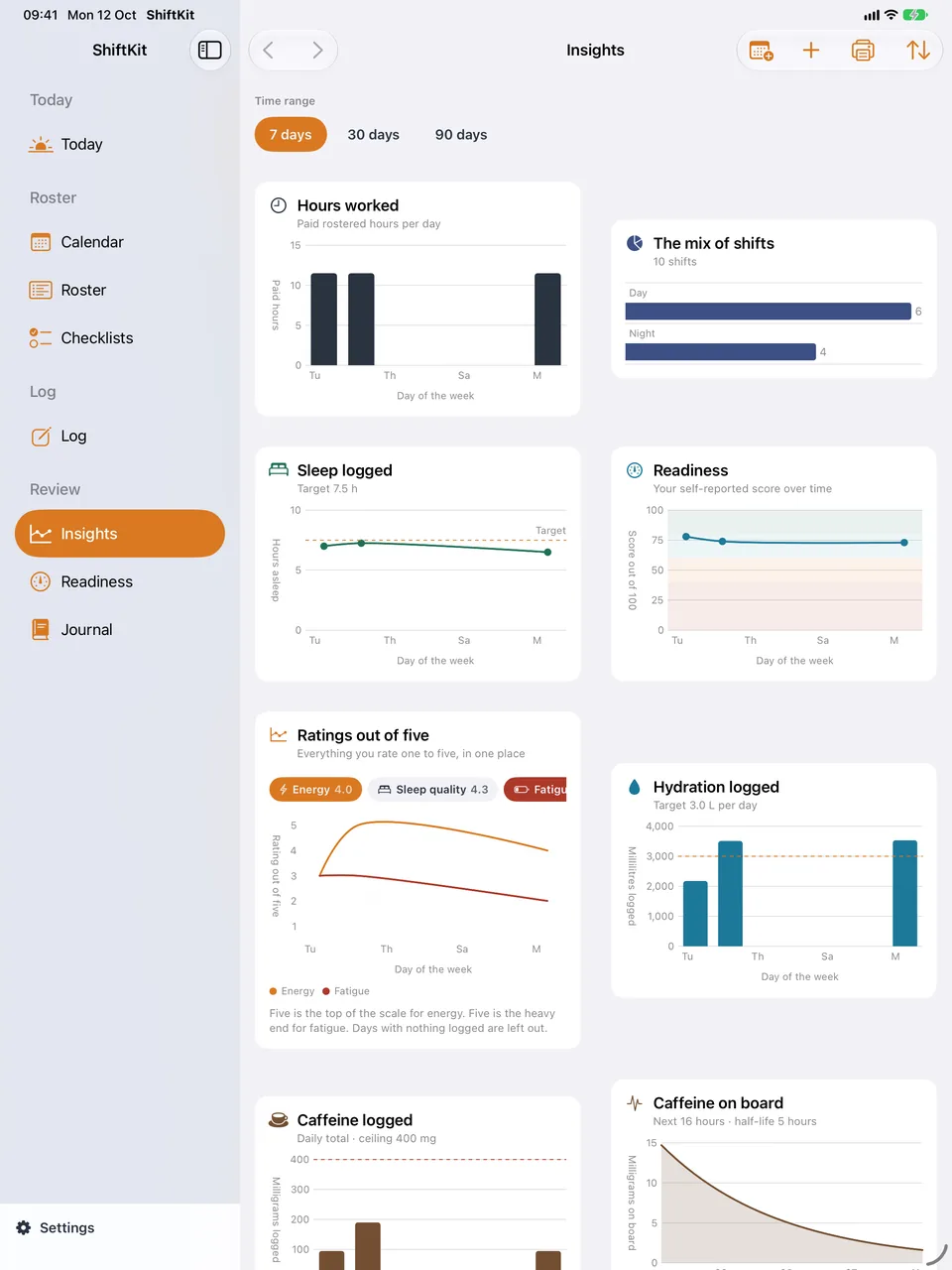
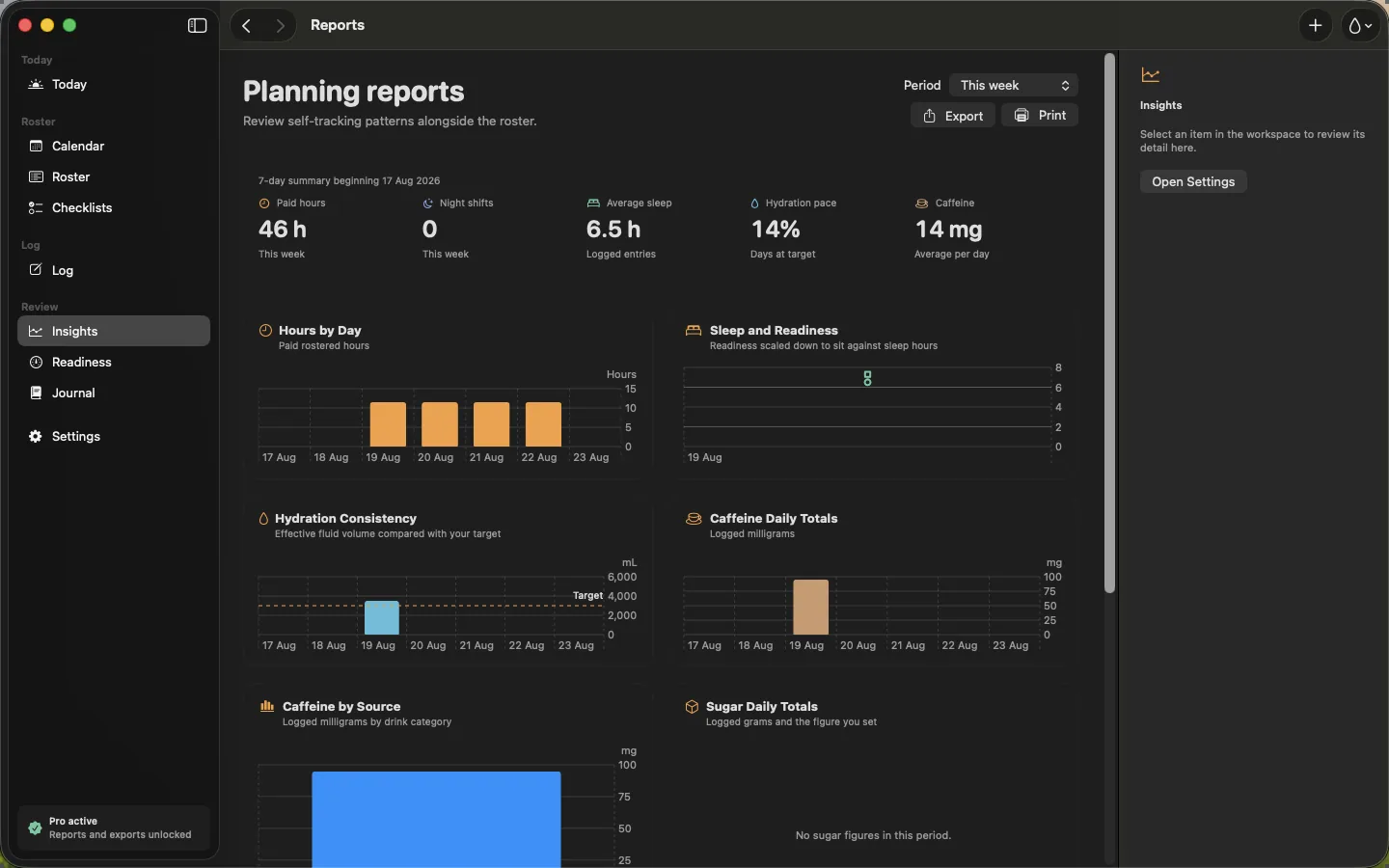
- Trends & Reports. Sleep, hydration, workload and readiness across weeks and months rather than a week.
- Unlimited Journal. Every post-shift note kept, not the last 30 days.
- Printed Reports. Your calendar, your shift list and your daily figures on tidy A4, or the same thing saved as a PDF. Print one month, or two, four or six months from this one, a calendar page each.
- Export & Backup. CSV and PDF summaries for your own records.
- iCloud Backup & Sync. The same roster, readiness, drinks and notes on every device through your own iCloud, with dated backups you can restore onto a new phone. There is still no ShiftKit account and no ShiftKit server.

Day to day
The parts you touch on shift
Energy Drinks & Sugar
Log named products by their stated serve and read the full label record — caffeine, sugar, taurine, guarana and B vitamins. Add your own drinks, and track sugar against the figure you set.
The library carries what turns up in a crib room: instant coffee, three-in-one sachets, chicory blends and the rest.
Protein Tracking
A protein log with one hundred products sold in Australia built in — powders, bars and ready-to-drink shakes — with serve size and label figures, barcode lookup and your own products.
Grams come from three places and are counted once each: the protein log, a figure on a meal, and any drink whose label declares protein. The day's total sits against the figure you set, which is yours to choose and which ShiftKit makes no suggestion about.
Shift-aware Reminders
Pre-shift, mid-shift and wind-down prompts timed to your roster rather than to the clock, instead of the single reminder free allows.
Unlimited Templates
Reusable checklists, with a template per shift kind, rather than two.
Home & Lock Screen Widgets
Next shift, water, readiness and protein on the Home Screen and the Lock Screen, including a countdown to the next shift.
Watch Complications
Readiness, water and protein on the watch face, at a glance.
Apple Health
Read the sleep your Apple Watch already recorded instead of typing it, and send your water, caffeine and protein across to the Health app. Off until you turn it on, and nothing is read without your permission.
Weather & Conditions
Conditions now, the next twelve hours, and the daily high and low behind you, for a place you set. Read from Apple's weather service and shown on Insights beside your own figures, with a link through to the Bureau of Meteorology radar.
Off until you turn it on. A town typed in needs no location permission, and a current position is used for the lookup only, never saved, synced or backed up. On iPhone and iPad.
Your body over a swing
A record of how the roster read on you
All of it is a diary of what you wrote down. Nothing here diagnoses anything, scores you, or says whether you are fit to work.
Circadian Load
One figure from 0 to 100 for the day, drawn as a ring, worked out from your roster and from the sleep and heart figures you already have in Health.
A run of nights holds the figure up on its own, so night three reads high whatever else the week looked like.
Workouts & Exercise Library
A library of 265 exercises, one tap for a walk or a run, and workouts brought in from your Watch without turning up twice.
Sets are kept per exercise, so you can see what you lifted last time.
Breathing & Meditation
Paced breathing with the phase named as it changes, a plain timer for silence, the twenty guided sessions, and the 72 pieces of the sound library that are fetched on demand — the rest of the ambient tones, the recordings made outdoors, and the immersive pieces placed around you as they play.
The sleep sound and alarm screen, the wake alarm, the overnight session and eight sleep sounds inside the app download are free for everyone. Pro is the other 72.
Your own music can go in their place, and the minutes can be sent across to the Health app.
Symptom Tracking
A library of 144 symptoms across twelve body systems, searchable by the words you would actually use, with four severity levels off the published wording and your own additions.
A row of six shortcuts on the Log screen covers the ones you log most. What you see is a count of what you wrote down; severity is never averaged into a score.
Mood Logging
A short scale and a note, logged as often as you like, shown beside the shifts you worked.
Cycle Logging
Mark the days you bleed, with a flow level and a note, and see the average lengths and the expected next start worked out from what you have logged.
Predictions can be paused whenever you want.
Perimenopause & Menopause
Say which of the three stages you are in and the app follows it: perimenopause and postmenopause bring in the symptom set named by Jean Hailes for Women's Health and the Australasian Menopause Society, and drop the expected dates a changing cycle cannot support.
Bleeding days stay loggable throughout.
What you take
A diary, not advice
Write down what you took and when. ShiftKit never suggests changing what you take, and never tells you what something does for you.
Medications
Write down what you took and when, keep your own list, and look up a published half-life range in the reference library.
It draws a textbook curve of one amount coming away. A diary, not advice, and never a reason to change anything. A detection window, where one is given, is not a clearance time.
Supplement Tracking
Log what you take from a library of Australian supplements, and carry the vitamins, minerals and other figures the label declares into the day.
What a supplement is for is not something a log can tell you, so ShiftKit does not say.
Glucose & Insulin
Write down glucose readings and insulin amounts, see the share of your readings inside your own range, and read an estimate of insulin still active from a published model.
A record, not advice. ShiftKit does not calculate an amount to take.
Nicotine Tracking
Log cigarettes by the stick and vapes by the strength on the label and the millilitres you got through, added up for the day in milligrams and set against a figure you choose.
The product, the amount and the time. Nothing about what it does.
Pay and paperwork
The figures as they were printed
The parts you hand to somebody else: what you were paid, and one page that gathers a period up.
Pay & Earnings
Rates per site, earnings per placement, invoice-ready summaries, and payslips read from the file your payroll system sent.
Gross, net, tax withheld, superannuation and paid hours are reported as printed. ShiftKit does not check a payslip, does not say whether one is right or wrong, and gives no advice on tax, superannuation or entitlements. Printed reports deliberately carry no money figures.
Read Report
One page for a day, a swing, or any dates you pick: the rings and the daily figures, every curve, and an itemised list of every meal, drink, snack and shift behind them.
Choose which panels appear and in what order, then print the same report or save it as a PDF.
Buying it
Three ways, one purchase
- AUD $7.99 a month, or $44.99 a year with a 7-day free trial.
- AUD $119.99 once for Lifetime, including Pro features added later.
- Universal Purchase: buy it on any one of iPhone, iPad, Mac or Apple Watch and it is yours on all of them, on the same Apple Account.
- Purchases and restores are handled by Apple through StoreKit. The developer never sees your payment details.
- Cancel a subscription in your App Store account settings. What you entered stays; the Pro features close.

The whole list
All thirty-one Pro features, so you can count them
The same names they carry inside the app, in the order the app lists them.
- Trends & Reports
- Unlimited Templates
- Shift-aware Reminders
- Export & Backup
- Printed Reports
- Home & Lock Screen Widgets
- Watch Complications
- Unlimited Journal
- Roster Pattern Builder
- Pay & Earnings
- Energy Drinks & Sugar
- iCloud Backup & Sync
- Apple Health
- Itinerary Import
- Roles & Sites
- Shift Time Library
- Travel Logistics
- Protein Tracking
- Supplement Tracking
- Workouts & Exercise Library
- Nicotine Tracking
- Glucose & Insulin
- Medications
- Cycle Logging
- Perimenopause & Menopause
- Symptom Tracking
- Mood Logging
- Breathing & Meditation
- Circadian Load
- Read Report
- Weather & Conditions
Thirty-one features, one purchase. AUD $7.99 a month, AUD $44.99 a year with a 7-day free trial, or AUD $119.99 once for Lifetime, which includes Pro features added later.
Worth saying
What Pro is not
Pro does not make ShiftKit a medical device. It does not diagnose anything, it does not assess fitness for duty, and it is not an approved system of record. Do not put patient-identifying information or incident numbers into it. Everything it shows you is a summary of what you chose to log.